
Top 5 Windows Metadata Editors in 2026 - Edit File Metadata Easily
By Vivian Cole Updated on 2025-12-16
Managing metadata is essential for keeping digital files organized, but many Windows users struggle with missing tags, messy file names, or limited editing options. That’s where a Windows metadata editor comes in.
With the right file metadata editor, audio enthusiasts can fix song titles, artists, albums, cover art, and even advanced audio features. Photographers can manage EXIF, IPTC, or XMP metadata, while video editors can tag MP4 and other video formats for easier library organization. Even casual users benefit from manually correcting file properties in Windows.
In this guide, we will explore the best metadata editors — from MP3 tag editors and video or photo metadata editors to a simple built-in tool. These metadata editors will help you maintain a well-organized digital library, so you can spend more time enjoying your media instead of searching for information.
Keep reading!
Table of Contents
Part 1. Why Metadata Editing Matters on Windows
Proper metadata is key to keeping your digital files organized and easy to manage. Without it, searching, sorting, or retrieving files can become frustrating and time-consuming. For example, DJs rely on correct audio tags to mix tracks smoothly, photographers need detailed image metadata to keep projects on track, and video editors gain efficiency when their clips are accurately labeled.
Windows metadata editors make this process much easier. They offer tools for batch editing, automated tagging, or manual corrections, giving you control and flexibility. Maintaining a clean and accurate metadata library not only improves workflow and reduces errors, but also ensures your files remain compatible with music players, photo apps, and video software.
Top 5 Dedicated Windows Metadata Editors
ID3Genius - Best for Audio Metadata Editing
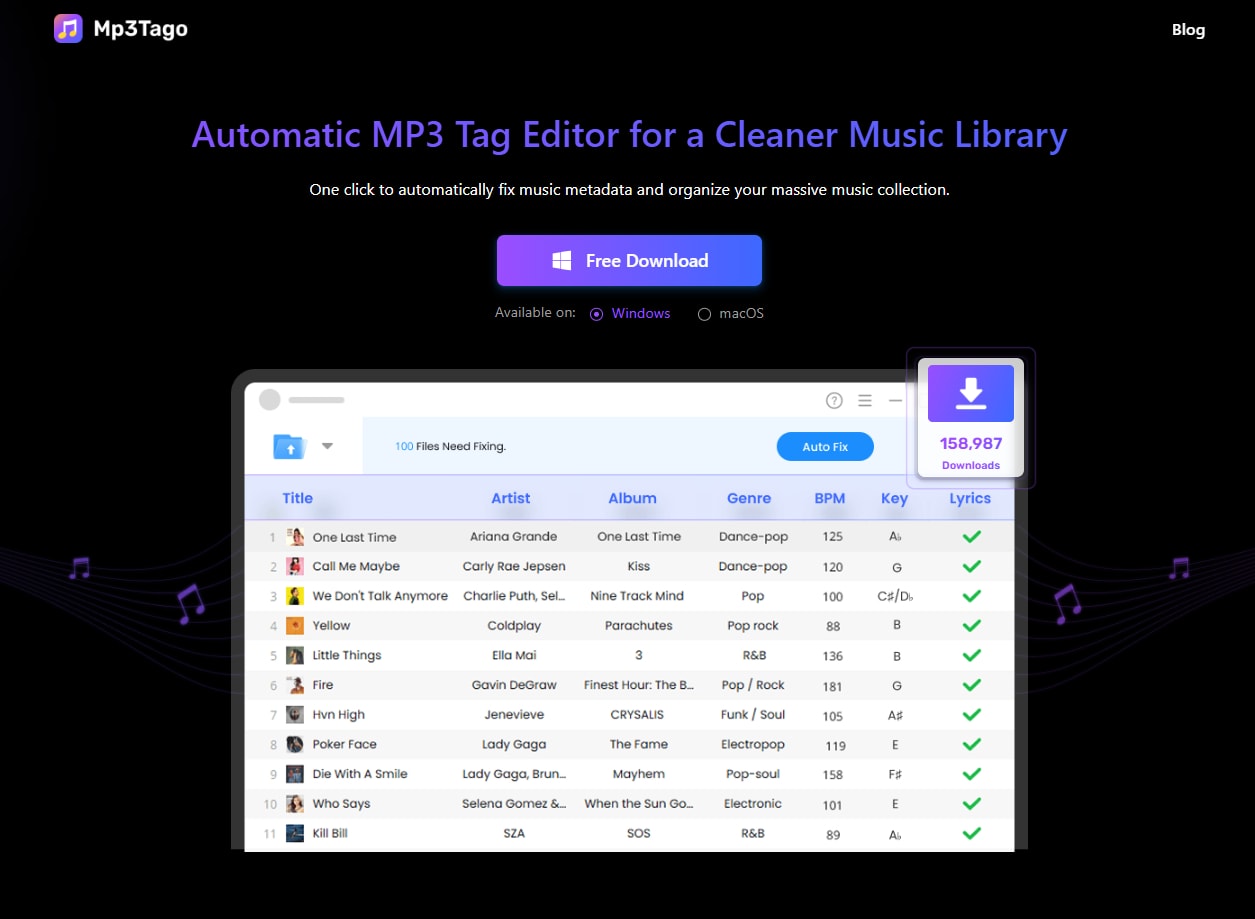
ID3Genius is a powerful and user-friendly audio metadata editor designed for anyone who wants a well-organized music collection. It makes organizing your music library fast by automatically batch-fixing music metadata in seconds. With just one click, the MP3 tag editor matches songs with accurate information from music databases like Spotify, MusicBrainz, and Discogs.
You can quickly edit basic metadata like title, artist, album, genre, and cover art. ID3Genius audio file metadata also handles extended tags such as Composer, Remixed By, Label, and ISRC. Thanks to AI-powered analysis, it can detect audio features like BPM, key, Camelot, Energy, and Danceability — helping you organize, sort, and understand your music collection effortlessly.
ID3Genius works with all major audio formats, including MP3, M4A, FLAC, and WAV, and can automatically rename files based on metadata to keep your library organized. Whether you’re a DJ preparing tracks or a music enthusiast managing a large library, the metadata editing software offers automated tagging and manual editing, giving you full control while saving time.
Take control of your music files and make your MP3 collection shine. Try ID3Genius now!
Pro ID3 Tag Editor
Auto-matchh and fix music metadata in 1 click
Pros
- Batch detects and fixes audio metadata in seconds
- Supports all major audio formats (MP3, M4A, FLAC, WAV)
- Advanced audio feature analysis
- Auto-rename files based on metadata for consistent organization
- Beginner-friendly interface and safe to use
- Pulls accurate data from Spotify, MusicBrainz, Discogs
Cons
- Not suitable for video or image files
How to edit audio file metadata in Windows 10 with ID3Genius music tag editor:
-
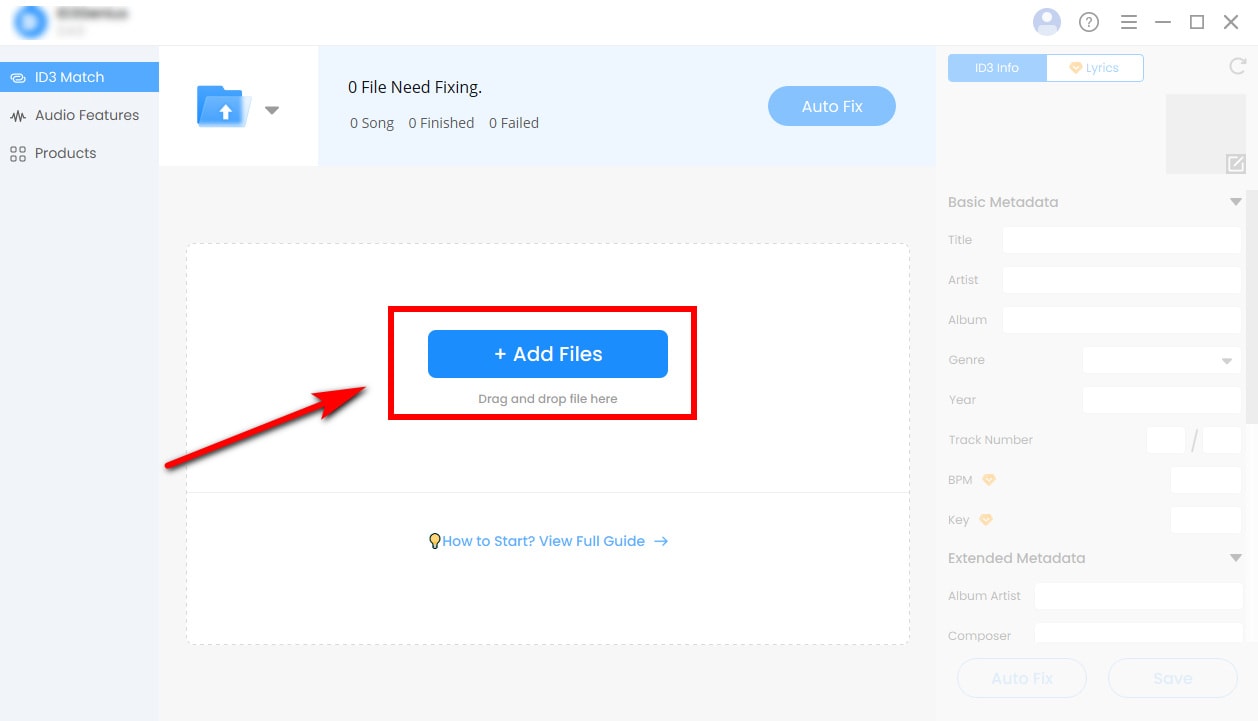
Upload Your Audio Files
Click "Add File" to import your tracks, or drag and drop files — or even a whole folder — directly into the audio file metadata editor. -
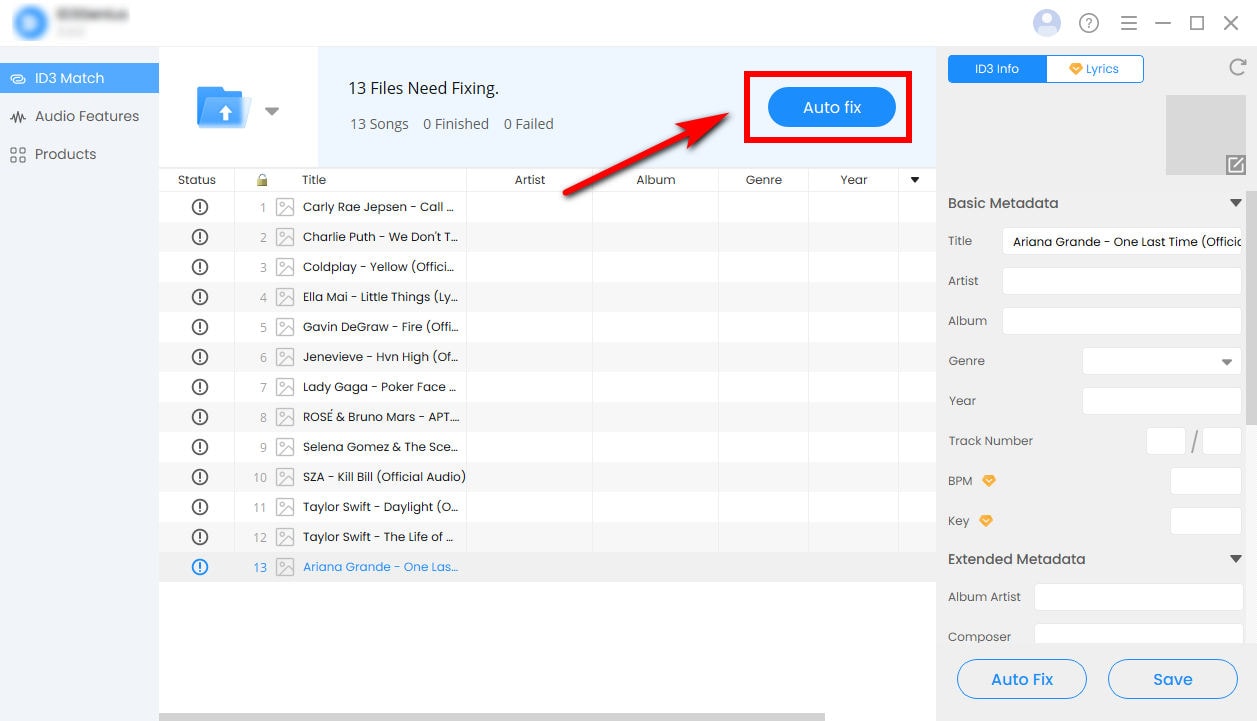
Fetch Metadata Automatically
Press "Auto Fix" and watch as the Windows metadata editor automatically fills in missing details or fixes wrong metadata: album covers, artist names, track titles, albums, genres, and art work are all updated instantly from reliable online sources. -
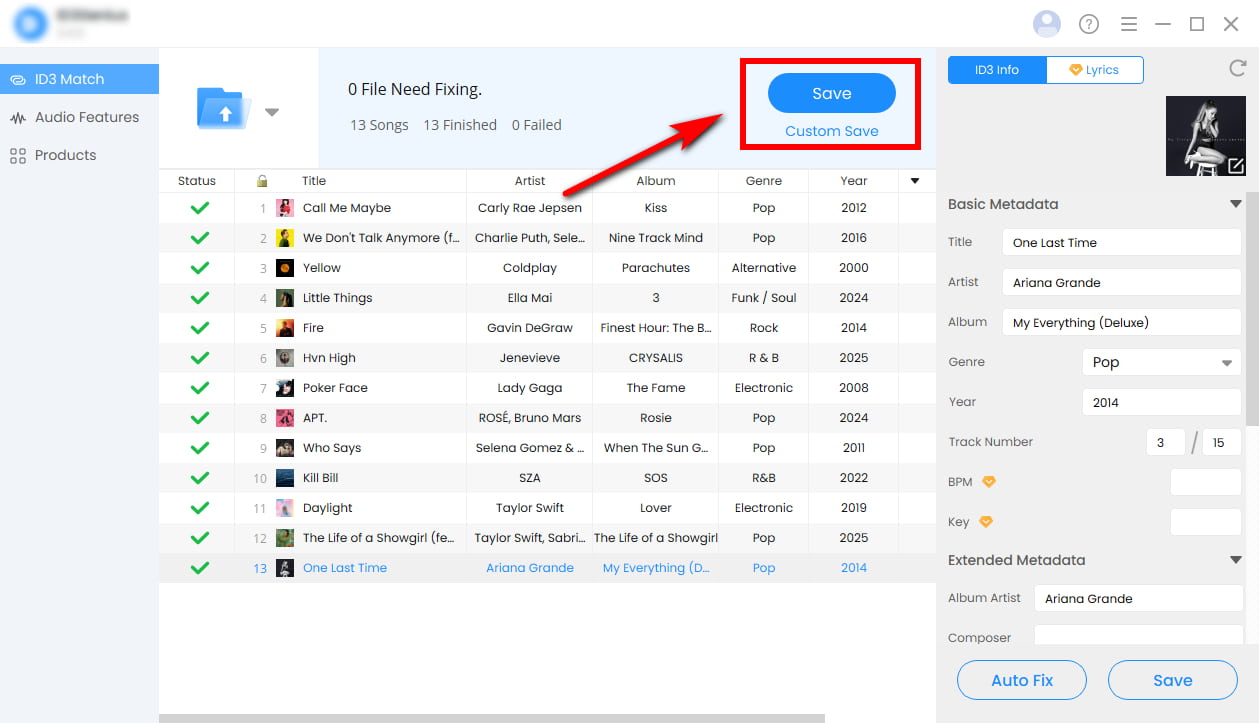
Review and Customize Tags
After automatic tagging, hit "Save" to lock in the changes. Want to tweak things further? You can manually adjust any ID3 field — cover art, title, artist, album, genre, release year, BPM, or key — to make sure every track looks perfect across all media players.
Tips:
Use the Lyrics and Audio Features panels to quickly fetch synchronized lyrics and view track details like BPM, key, and Camelot value — perfect for DJs, playlist building, or a fully organized music library.
ExifTool - Best for Advanced & Technical Users
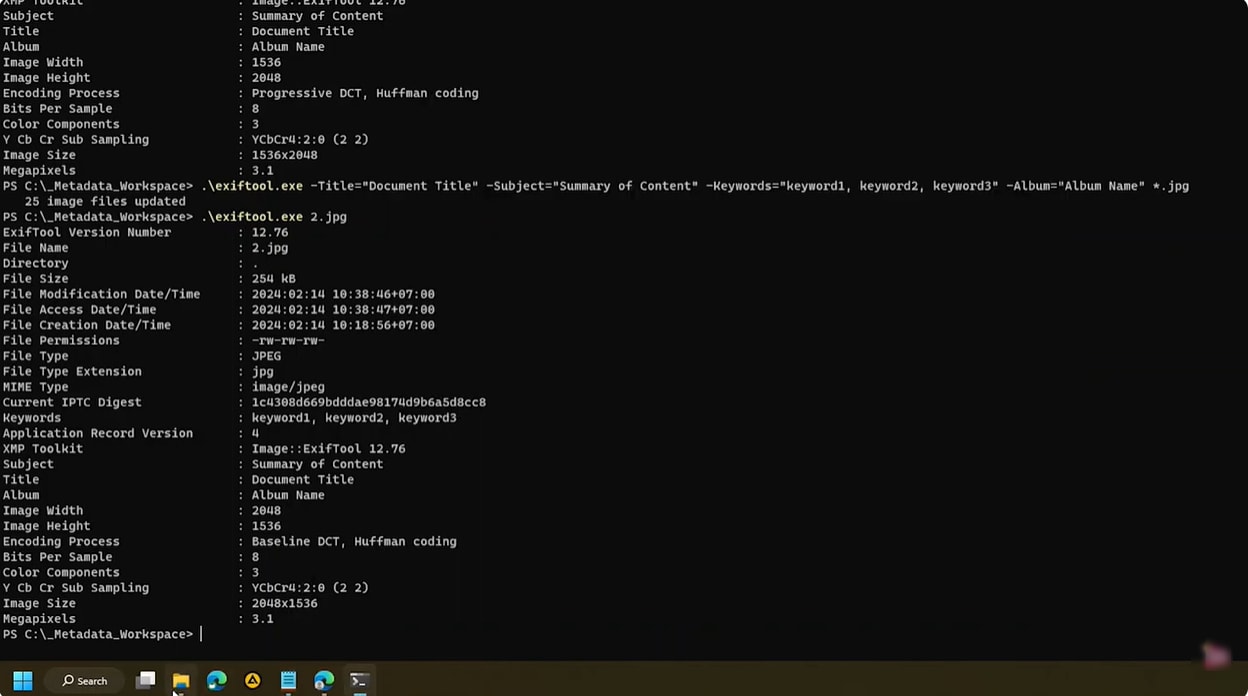
ExifTool is a powerful command-line (text-based) metadata editor for Windows. It supports images, audio, video, and document files. With ExifTool, you can batch edit hundreds of files and work with common metadata standards such as EXIF, IPTC, XMP, and ID3. To get started, simply download the executable, open Command Prompt, and run commands like exiftool -Artist="Name" *.mp3 to update metadata in bulk. While it offers exceptional flexibility and control, ExifTool is best suited for advanced users who are comfortable working in a command-line environment.
Pros
- Works with many different file types
- Extremely powerful batch processing capabilities
- Works with major metadata standards such as EXIF, IPTC, XMP, and ID3
- Free and open source, with strong community support
Cons
- Command-line only, with no graphical user interface
- Steep learning curve for non-technical users
- Not ideal for quick edits or beginners who prefer a visual workflow
MP4 Video and Audio Tag Editor - Best for MP4 Video & Audio Tags
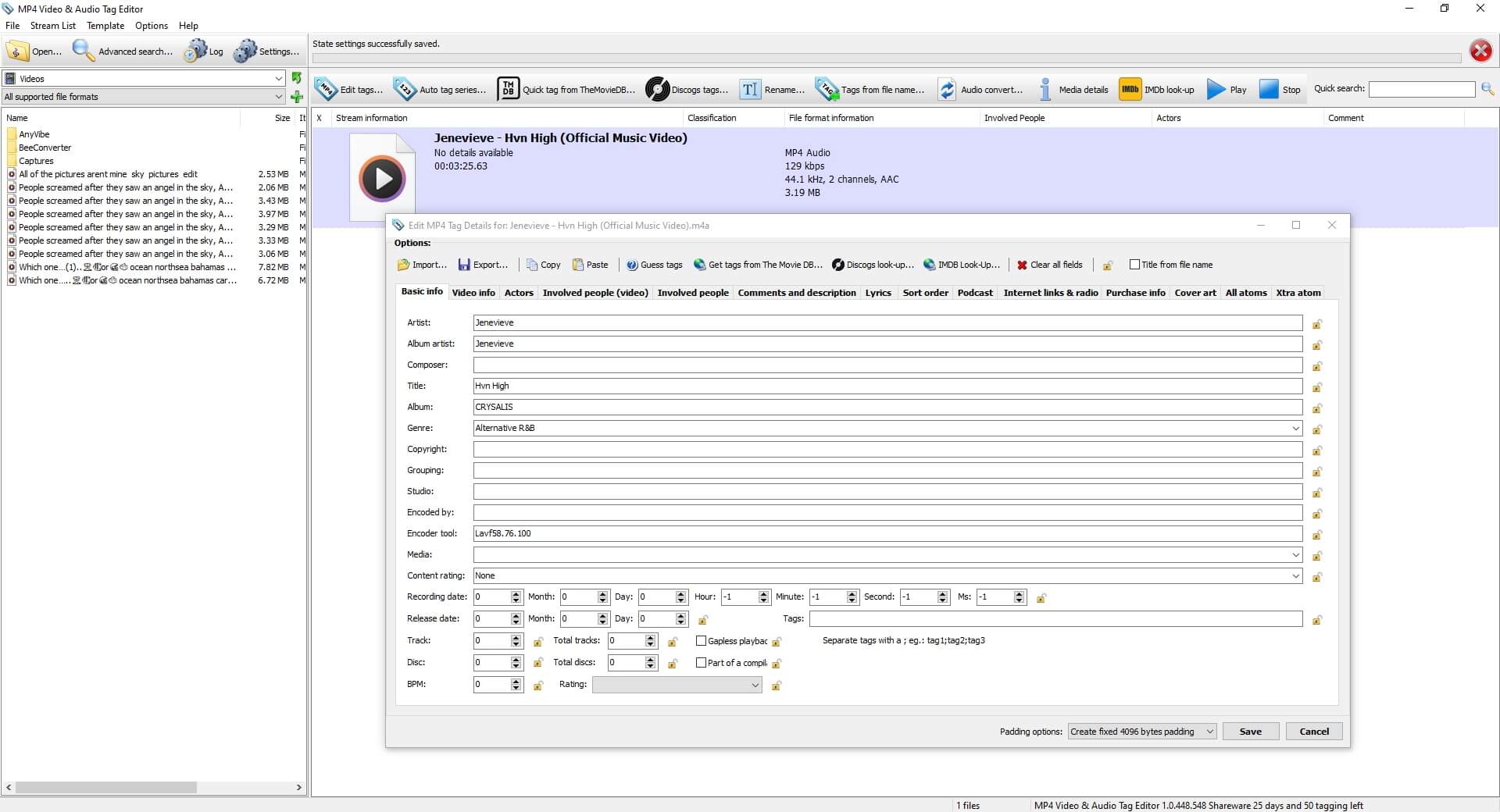
MP4 Video and Audio Tag Editor lives up to its name. The Windows metadata editor is designed specifically for video and audio files and makes organizing video and audio libraries simple. You can quickly add detailed tags, keywords, and cover art, then enrich your files with metadata and posters from The Movie Database. Besides, features like tag-based search and batch renaming make it easier to maintain a tidy, well-organized media library over time.
Pros
- Edits common metadata fields and manages cover art
- Supports basic editing and batch renaming
- Fetches video posters and music details from online databases
- Integrates with Windows File Explorer for quick access
- Converts audio to MP3, FLAC, Opus, Vorbis, and WAV
- Extracts audio from video files without re-encoding
Cons
- Batch editing works best for small or medium-sized libraries
- Interface may feel complex for users with simple tagging needs
XnView MP - Best for Image Metadata Management
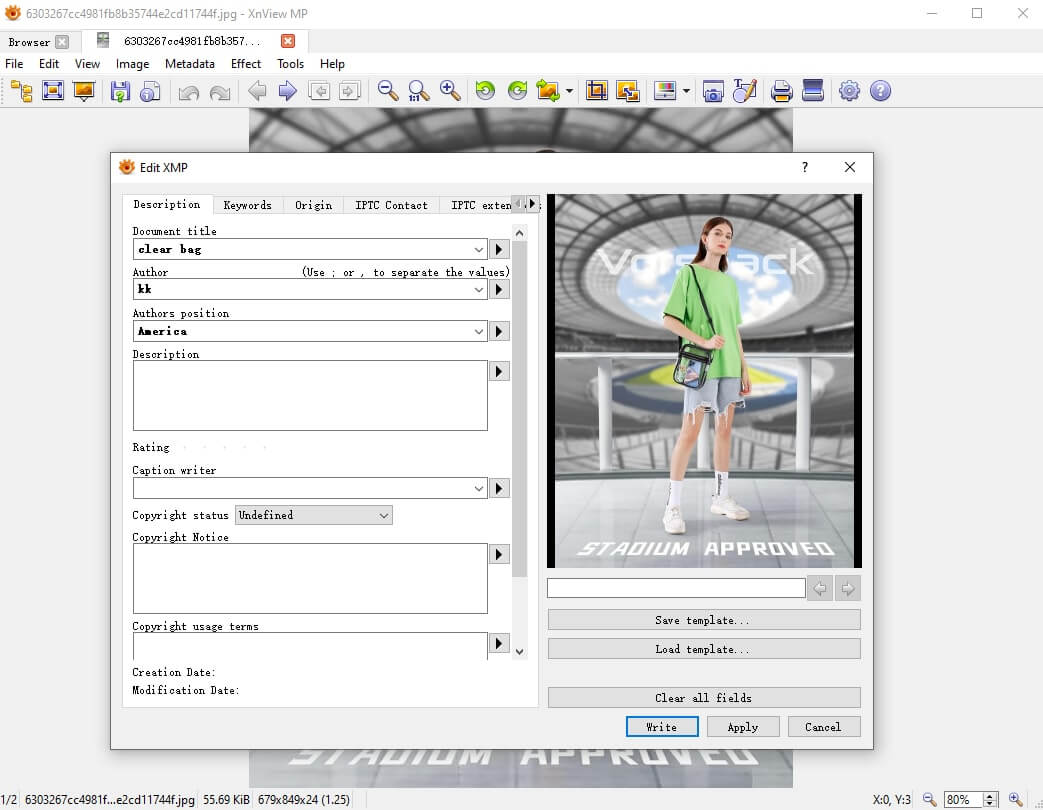
XnView MP is a multifunctional image viewer and metadata editor designed primarily for photo management. It allows you to view, organize, and edit image metadata including EXIF, IPTC, and XMP. The photo metadata editor supports more than 500 image formats, including RAW files, making it suitable for photographers and designers who work with diverse photo libraries. Metadata editing is handled in a dedicated panel, and batch processing lets you apply changes to multiple images at once. In addition to metadata management, XnView MP also offers basic image editing features like resizing, cropping, and color adjustments.
Pros
- Supports over 500 image formats, including RAW files
- Allows viewing and editing EXIF, IPTC, and XMP metadata
- Offers batch processing for image files
- Optional face tagging and GPS location visualization features
- Available on Windows, macOS, and Linux
Cons
- Interface feels dated and less intuitive for new users
- Face tagging lacks automatic recognition and smart search capabilities
Metadata++ - Best for Detailed Metadata Editing
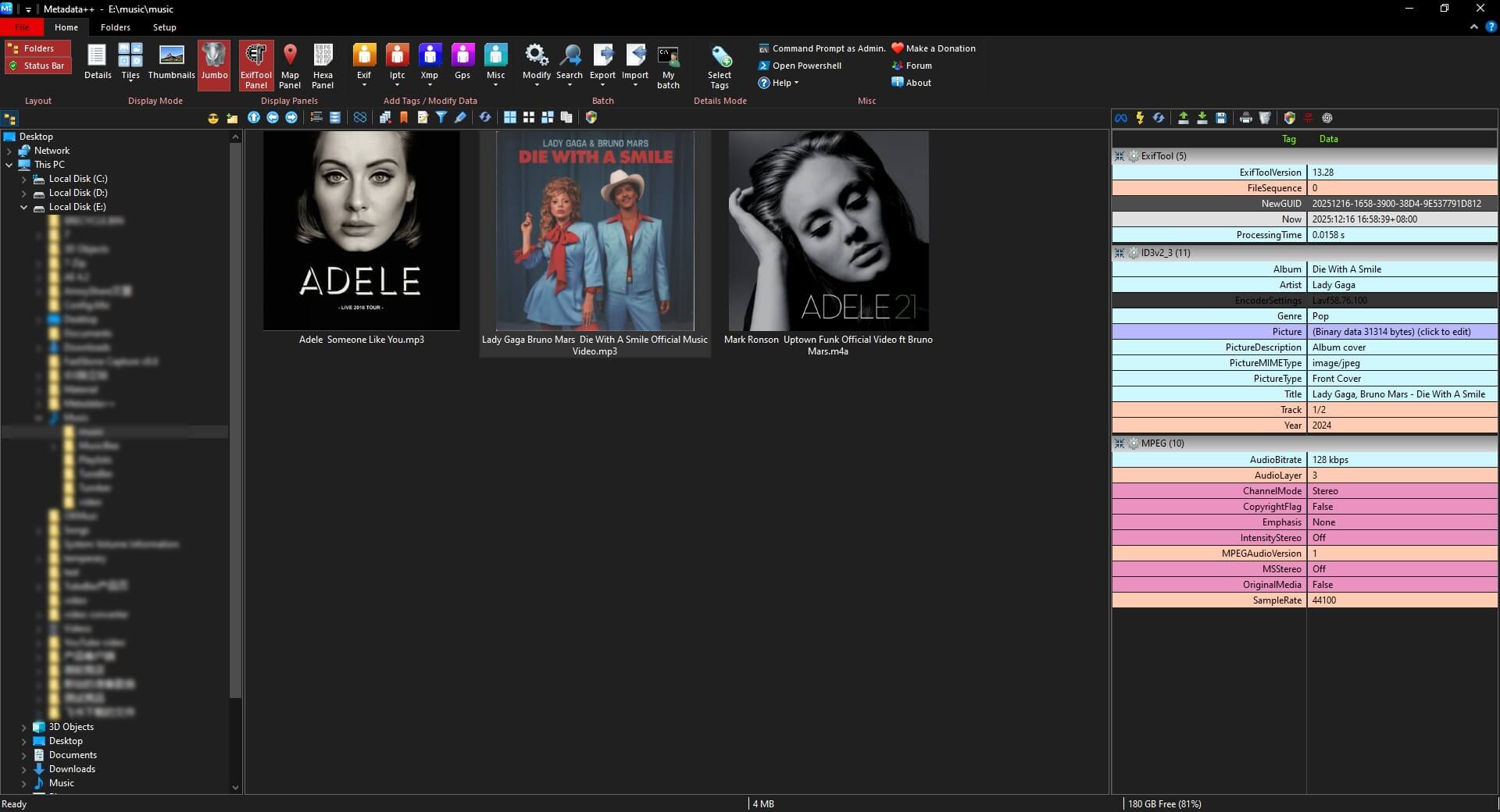
Metadata++ is a free metadata editor made for Windows. It lets you view, edit, add, and search metadata across many file types, including images, audio, video, and documents. If you prefer editing metadata manually, field by field, this tool gives you full control without getting in the way.
The windows file metadata editor integrates directly with Windows, so that you can edit metadata right from the file’s context menu. Metadata++ also supports sidecar files, which are helpful when working with formats that don’t store metadata natively. With a simple interface and built-in search, it’s a practical choice for everyday metadata tasks.
Pros
- Supports images, audio, video, and documents
- Allows detailed, field-level metadata editing
- Windows context menu integration for quick access
- Supports sidecar files for custom metadata
- Multilingual support and full Unicode display
Cons
- Lacks advanced automation or smart tagging features
- Interface is functional but fairly basic
Edit Metadata with Built-in Windows Metadata Editor
Sometimes, you don’t need a dedicated metadata editor. If you just want to make quick changes to a single image, audio, or video file, Windows File Explorer offers a simple built-in way to edit basic metadata. The file metadata editor works with popular file formats like JPG, PNG, MP3, and MP4, which is enough for simple, occasional edits such as changing a title or author.
Pros
- No additional software required
- Built directly into Windows File Explorer
- Quick and easy for simple
- Suitable for basic metadata fields
Cons
- No batch editing for large libraries
- Lacks advanced metadata and audio feature support
- Changes can be inconsistent across different file formats
Here’s how to edit metadata using Windows File Explorer (MP3 example):
- Find the file you want to edit, right-click the file, and choose Properties.
- In the pop-up window, switch to the Details tab. Click on a field you want to change, such as title, author, or genre, and enter the new value. Once done, click Apply, then OK to save your changes.


Conclusion
Metadata may be invisible, but it’s invaluable. Proper metadata management helps you organize, search, and enrich your media, making music, photos, and videos easier to navigate and enjoy. This article covered a range of Windows metadata editors, from tools for detailed technical adjustments to a built-in editor for quick fixes. When it comes to audio files, ID3Genius automatic MP3 tagging software stands out as a reliable solution. It automatically batch-fixes basic and extended tags and leverages AI to analyze features such as BPM, key, Camelot, Energy, and Danceability.
Ready to elevate your music collection? Let ID3Genius quickly fix or edit metadata of audio files, giving your library a neat, professional, and visually appealing look!
Pro ID3 Tag Editor
Auto-matchh and fix music metadata in 1 click
FAQs about Windows Metadata Editor
1. What is metadata editing software?
Metadata is information embedded in media files that describes details such as title, artist, album, genre, artwork, and more. Metadata editing software allows you to view, modify, and organize this hidden information. ID3Genius is a smart audio file metadata editor that not only handles basic and extended tags but also leverages AI to analyze audio features like BPM, key, Camelot, and energy, making your music library organized and easy to navigate.
2. How to batch edit MP3 tags?
You can edit MP3 metadata in batch with the effective ID3Genius metadata editor:
1. Upload your audio files by clicking Add Files.
2. Press Auto fix to auto-detect and update all missing or incorrect tags using reliable online music databases.
3. Save changes directly to your files or manually adjust details like track title, artist, album, year, artwork, and genre.
3. What are the best Windows metadata editors for audio files?
For audio files, ID3Genius stands out as a comprehensive Windows metadata editor. The MP3 tag editor supports popular audio formats such as MP3, FLAC, WAV, and AAC, allowing you to edit both basic tags and extended fields like Composer, Label, ISRC, and Remixed By. Once you add your music files, the tool quickly scans and auto-fills accurate metadata. The file metadata editor also leverages AI to analyze audio features such as BPM, key, Camelot, Energy, and Danceability, giving users deep insights while keeping their music library perfectly organized and visually appealing.
4. How can I automatically tag my MP3 files?
Automatically tagging MP3 files is easy with ID3Genius bulk metadata editor:
1. Drag or drop your MP3 files into the audio metadata editor using the Add Files button.
2. Click Auto fix to let the software fetch accurate metadata and album art from online databases.
3. Review the results and save changes, or manually fine-tune any ID3 field.
