


158,986
Downloads
The All-in-One MP3 Tag Editor to Organize Music Library
Auto Tag All MP3 Tags in Seconds
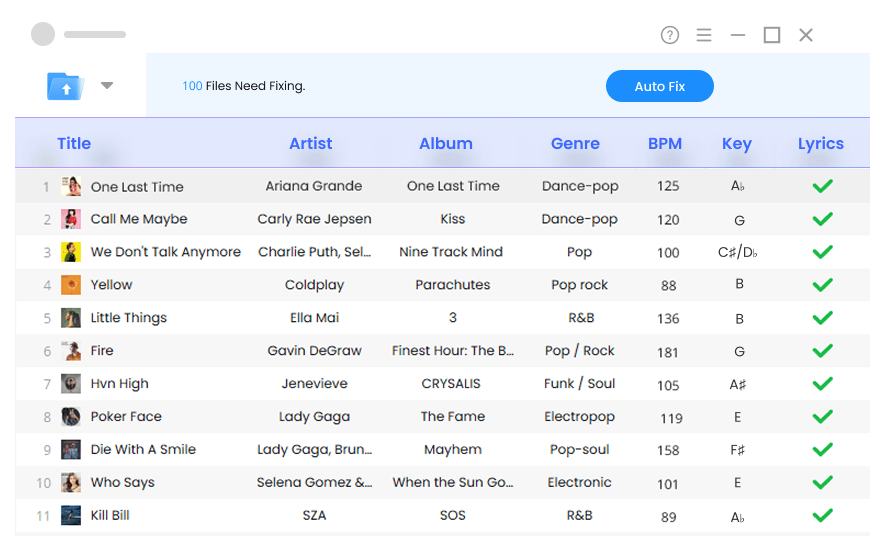
Quickly updates MP3 metadata like title, artist, album, genre, BPM, key, release year, track number, and more, so your library always looks neat, works perfectly with any player, and lets you easily create and manage playlists.

Fix Music Metadata in Bulk
Automatically fill in missing metadata and correct inaccurate ID3 tags across your entire library, saving hours of manual editing and keeping your collection perfectly organized.

Add Album Art to MP3
Instantly find and add beautiful album covers to your tracks, making your music library look complete and polished.

Song Lyrics Finder
Match accurate lyrics for your favorite tracks in seconds. Easily edit, copy, or download lyrics with timestamps.

Identify Music Genre
Find and tag the correct genre for every track.

BPM and Key Finder
Analyze your tracks to detect BPM and key for perfect DJ mixing.

Perfect Metadata, Ready for Any Platform
Mp3Tago automatically fixes and completes your music metadata, ensuring each track displays the correct title, artist, album art, BPM, key, and more across all major media players and DJ software.


How to Edit MP3 Metadata?
ID3 tags hold your music's key details — like song title, artist, album, genre, track number, release year, and more. This metadata editor automatically fills in missing info to keep your library complete.
-
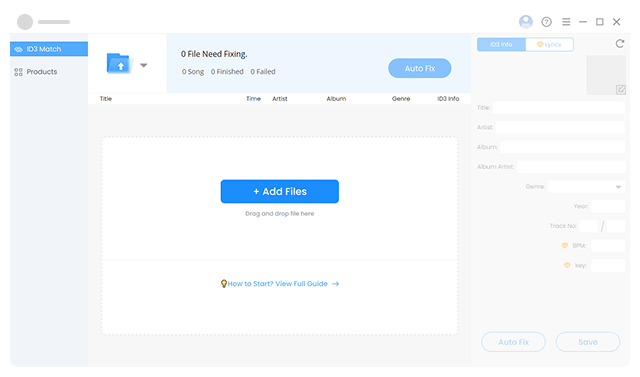
Step 1. Add Your Files
Hit "Add File" to pick your tracks, or directly drag and drop them into the upload area. You can import a single song or a whole folder.
-
-
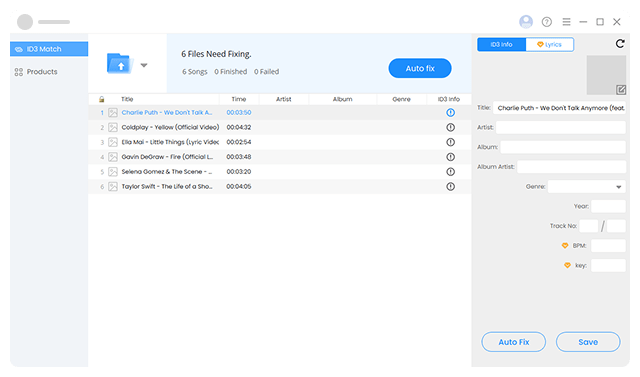
Step 2. Click Auto fix Button
Once uploaded, click "Auto fix" and let our MP3 tag editor automatically update metadata like title, artist, genre, album cover, etc., for all your songs at once.
-
-
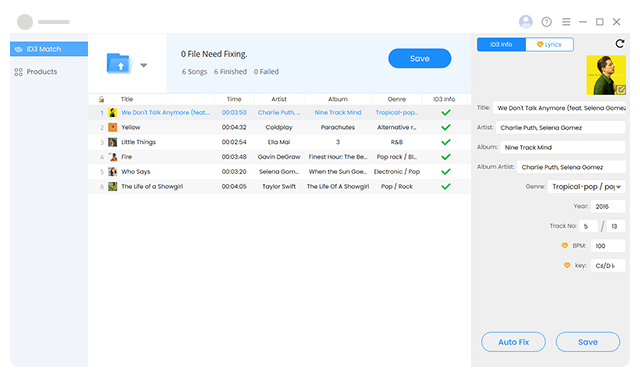
Step 3. Customize or Save Changes
You can select any track and manually edit its title, artist, cover art, and other details in the right panel if needed. When finished, click "Save" to apply all changes to your ID3 tags.
-


-
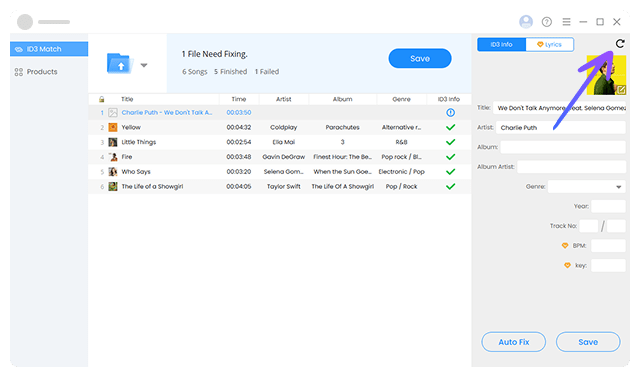
Step 1. Edit Tags When Necessary
If some tags fail to match or no results appear, click the "Reset" button above the album art, enter the correct Title and Artist, then click "Auto Fix" to update it instantly.
-
-
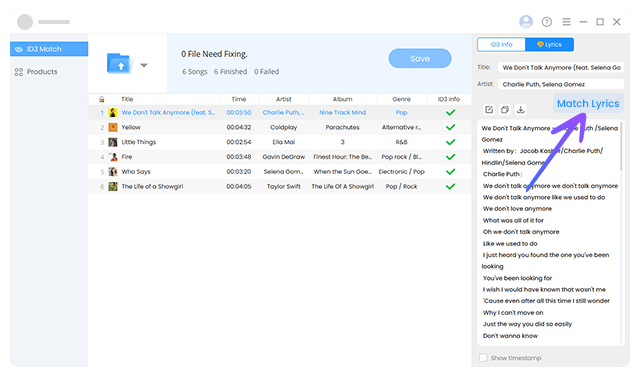
Step 2. Match & Download Lyrics
Quickly match lyrics to your tracks with 1 click. You can edit, copy, or save the lyrics separately — complete with optional line-by-line timestamps.
-


Explore More Features of MP3 Tag Editor
-

Sync Tags from Multiple Sources
Our music tag editor retrieves accurate music info from reliable databases like Spotify, MusicBrainz, Discogs, etc. It also fully supports Unicode, ensuring multilingual metadata displays perfectly.
-

Lock Specific Tags
Lock the ID3 fields you want to keep, and Mp3Tago will automatically fill in missing info and correct inaccurate metadata in the resy, including title, artist, album art, genre, release year, BPM, key, and more.
-

Handles Various Audio Formats
Easily edits metadata for MP3, FLAC, WAV, M4A, and other audio formats. Mp3Tago keeps your entire music collection organized, ready for playlists, DJ sets, high-quality playback, or personal archives.
-

Supports Key ID3 Tag Versions
Our MP3 metadata editor works with popular ID3 versions like ID3v1, ID3v2.3, and ID3v2.4. This ensures your metadata stays compatible across various media players and devices without hassle.
-

Reset MP3 Tags to Original Values
Made a mistake while editing or needed to auto-fix your music metadata again? No problem. Instantly reset ID3 tags with a single click, so you can fix errors safely and keep your music library accurate.
-

Built-in Music Player
The MP3 metadata editor allows you to quickly preview songs with the built-in player. Verify tags, album art, and lyrics in real time using the built-in player — no switching between tools required.
Trusted by Thousands of Music Lovers & Leading Brands

-

Mp3Tago is a fast and powerful music tag editor that makes managing large music collections easy. It can instantly auto-fix your song metadata in batch, add album covers, and fetch lyrics — very time-efficient.
-

Covering MP3, FLAC, WAV, and M4A, Mp3Tago handles all your music formats. The MP3 tagger's integrated player lets you listen while editing music tags, album art, or song lyrics, streamlining the entire process.
-

Mp3Tago ID3 tag editor can auto-fetch song tags and lyrics, preserve selected ID3 fields and fix all remaining metadata, making it perfect for DJs, music producers, and music lovers who want accurate, well-tagged tracks.
-

Mp3Tago is the go-to tool for managing your music library. Compatible with all major music players, the tag editor helps you quickly auto-fix metadata, embed album art, fetch lyrics, and preview songs with ease.
-
Mp3Tago is a fast and powerful music tag editor that makes managing large music collections easy. It can instantly auto-fix your song metadata in batch, add album covers, and fetch lyrics — very time-efficient.
-
Covering MP3, FLAC, WAV, and M4A, Mp3Tago handles all your music formats. The MP3 tagger's integrated player lets you listen while editing music tags, album art, or song lyrics, streamlining the entire process.
-
Mp3Tago ID3 tag editor can auto-fetch song tags and lyrics, preserve selected ID3 fields and fix all remaining metadata, making it perfect for DJs, music producers, and music lovers who want accurate, well-tagged tracks.
-
Mp3Tago is the go-to tool for managing your music library. Compatible with all major music players, the tag editor helps you quickly auto-fix metadata, embed album art, fetch lyrics, and preview songs with ease.
-
 Ricky Johnson
Podcaster -

Works great and super easy
Honestly, this app is amazing. Corrected a lot of messed-up MP3 tags and updated multiple files at once. I didn't even have to do much, just selected my music files or folder and it did the rest. My whole music library looks so organized now.
 Jessica Brown
Musician -
Love the ID3 lock option
Did exactly what I wanted. I can lock the artist and release year so they don't get changed, then let the MP3 file tag editor auto-fix the rest if the files. That's super smart. No more worrying about losing the metadata I already had.
 Barry Williams
Music Collector -
An essential tool for managing music cllection
I'm kind of OCD about my massasive music library, and this program is a life-saver! The batch fix feature cleaned up all my tags, including artwork, genres, release years, and BPM, making everything neat and organized.
 Leila Morgan
Audiophile -
The best MP3 tagger out there
I've been using Mp3Tago for a long time, it's super well designed, easy to use, and lets me add or edit all the metadata in my music files. Regular updates keep it reliable and efficient for managing hundreds of tracks!
 Gary Wilson
DJ & Producer -
Fast, safe, and perfect results
Absolutely amazing! It fixed all my song metadata in seconds, and I was able to save them as new files, nothing got messed up. Now my songs finally show all the right info in Windows Media Player and iTunes. Love it!
Ricky Johnson
Podcaster -
Works great and super easy
Honestly, this app is amazing. Corrected a lot of messed-up MP3 tags and updated multiple files at once. I didn't even have to do much, just selected my music files or folder and it did the rest. My whole music library looks so organized now.
Jessica Brown
Musician -
Love the ID3 lock option
Did exactly what I wanted. I can lock artist and release year so they don't get changed, then let the tool auto-fix the rest files. That's super smart. No more worrying about losing the metadata I already had.
Barry Williams
Music Collector -
An essential tool for managing music cllection
I'm kind of OCD about my massasive music library, and this program is a life-saver! The batch fix feature cleaned up all my tags, including artwork, genres, release years, and BPM, making everything neat and organized.
Leila Morgan
Audiophile -
The best MP3 tagger out there
I've been using Mp3Tago for a long time, it's super well designed, easy to use, and lets me add or edit all the metadata in my music files. Regular updates keep it reliable and efficient for managing hundreds of tracks!
Gary Wilson
DJ & Producer
FAQs About MP3 Tag Editor
-
1. How to add album cover to MP3?
You can add cover art to MP3 with our powerful metadata editor:
1. Upload your MP3 files by clicking "Add Files."
2. Hit "Auto fix" to automatically fix MP3 metadata, including album cover from online music databases, or you can manually add your desired music covers to the audio files.
3. Click "Save" to update changes to your MP3 files. -
2. How to edit MP3 metadata on Mac?
It's really easy to edit MP3 metadata using Mp3Tago music tag editor for Mac. Here's how:
1. Drag and drop your MP3 files into the ID3 tag editor on your Mac.
2. Click "Auto fix" to update ID3 metadata automatically, or you can manually edit MP3 tags like title, artist, album art, genre, etc.
3. When you're satisfied with the result, hit "Save" to apply the changes to your audio files. -
3. What's the best free MP3 tag editor?
Mp3Tago is the best free MP3 tag editor available for both Windows and macOS. It auto-fixes music metadata in one click — updating title, artist, genre, album art, and even matching lyrics quickly and accurately. The music tag editor supports multiple audio formats (MP3, WAV, FLAC, M4A) and major ID3 tag versions. Once fixed, your songs display perfectly in all popular music players and DJ software.
-
4. Is it safe to download and use MP3 tag editor?
Absolutely! Mp3Tago is 100% safe and ad-free. When you use the music metadata editor, all music files are processed locally on your computer, nothing is sent to any server or cloud. Your files and personal information stay completely private.
-
5. How do I edit MP3 tags in Windows?
Editing MP3 tags in Windows is simple with Mp3Tago. Just open the audio tag editor, drag in your songs, and click "Auto fix" to correct missing or wrong metadata. You can also edit track title, genre, and other metadata manually.
When you're done, hit "Save" — your tracks are updated instantly, and your music library stays neat and organized. -
6. Does editing the tags have any impact on audio quality?
Not at all. Editing MP3 tags only updates the metadata — such as title, artist, album, genre, and cover art. Mp3Tago audio metadata editor does not alter the audio itself, so your music quality stays completely intact, no matter how many edits you make.
Mp3Tago Is Available in Your Language
- English
- Italiano
- Deutsch
- Français
- Português
- Polski
- Español
- 日本語
- 한국어
- 繁体中文
- 简体中文
Ready to Get Started?
Make your music library shine today with Mp3Tago music tag editor.

Fast, safe, and perfect results
Absolutely amazing! It fixed all my song metadata in seconds, and I was able to save them as new files, nothing got messed up. Now my songs finally show all the right info in Windows Media Player and iTunes. Love it!